Scheduled Changes
The first feature workflow that we worked on was enabling our users to schedule their flag updates. This was the first feature because:
Scheduled changes were the most requested feature from our customers.
We needed to build the ‘simplest’ thing first and scheduled changes could be broken down into simpler iterations.
Scheduled changes would lay the technical foundation for future workflows.
User Persona and goals
Understanding our users’ needs.
One of the biggest unmet needs for our users was the ability to schedule their feature releases. Through user research we found that:
Users would log on to LaunchDarkly outside of work hours to turn a feature on; in some cases, it was in the middle of the night.
Users, specifically product managers, had feature rollout plans that they wished to automate.
Product managers found creative ways to schedule their own changes using hacked together workarounds.

User research and feedback requests were used to uncover user needs and pain.

Our users would set reminders to turn flags on/off. They also found their own hacky workarounds using unintentional features to schedule flag changes.
Design explorations
What do we need to design for?
As I approached the design for this feature I had to keep in mind that scheduled changes was the first of many workflows that could be put together. Initial sketches were explorations of ways to:
Define the change a user wants to make to a flag.
Set a condition for the change (scheduled date, approval, external metric),
Review and build.
See all pending changes.


Designing Iteratively
Starting with an end goal in mind helped us break-down the work to be done across the timeline. As a team we decided that starting with a work-flow builder would be too much to take on at once and the best way to release the new feature was to start smaller.
The next question to solve was what is the smallest step we can take to release scheduled changes?
The process to update a change is go to flag > make changes > save changes. We thought the best way to introduce scheduled changes was to keep this process the same and add ‘schedule changes’ as part of the ‘save changes’ flow.

Review and schedule Changes
After a user selects ‘schedule changes’ they can
Set the desired scheduled date to push the changes.
Review and edit the changes within the modal.
Add comments for audit history.


Describing changes in a new way
As part of the groundwork for feature workflows we needed a way to define flag changes outside of the flag details page. This meant describing each type of change in a modular fashion.

Empty state of the pending change drawer. We wanted to show users how to schedule changes (or build workflows) if they happened to open the pending drawer.
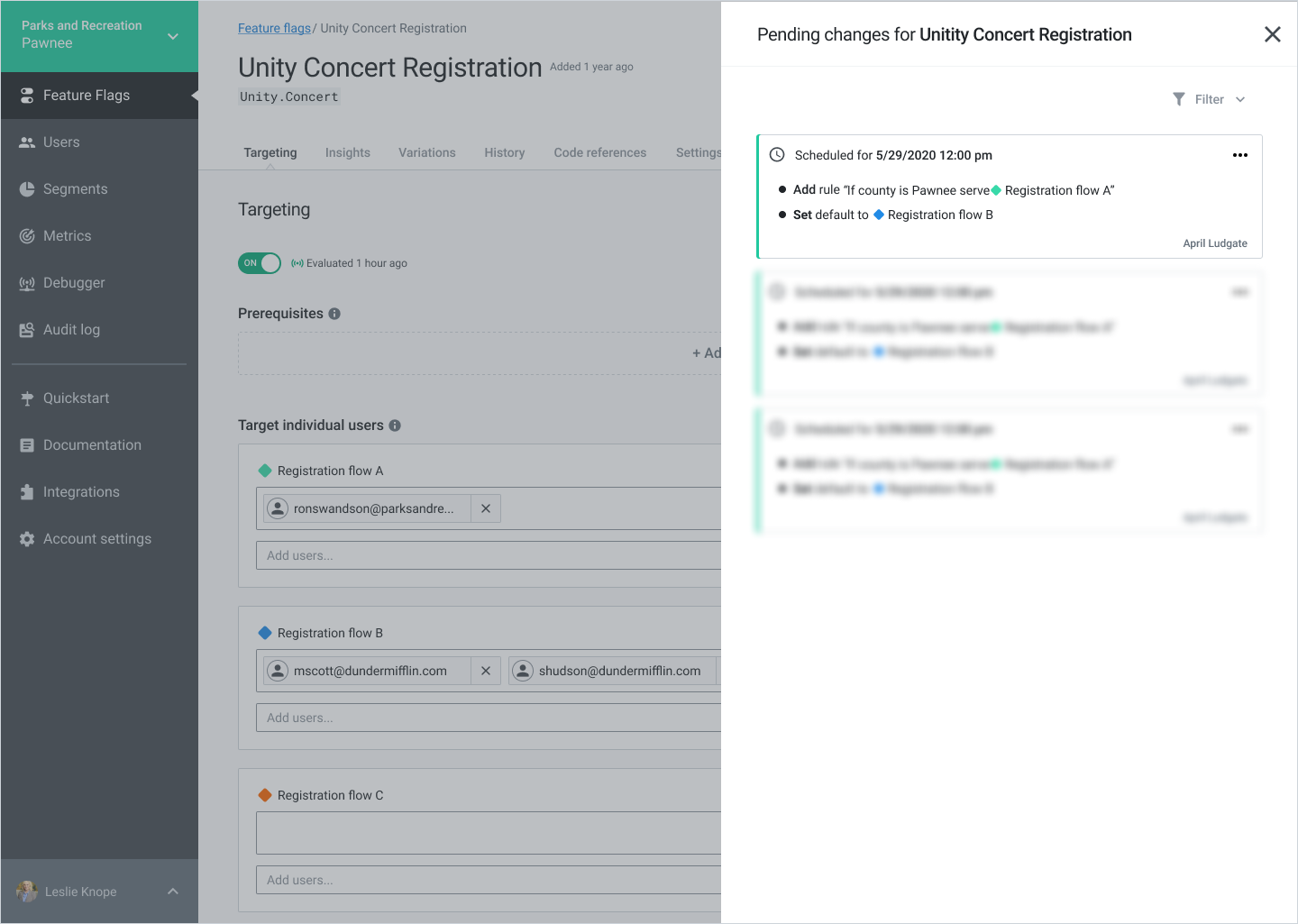
Viewing pending changes from the flag details page. All pending changes would appear here. Each card had the option to edit, remove, or link to the pending change.
Designing for edge cases
One of the complexities I had to design for was the error state of ‘conflicts’. A scheduled change or any pending workflow could fail if a change tried to modify an entity that no longer existed. We had to be aware of all pending changes and warn users if they were introducing a conflict, the resulting impact of the conflict, and a way to remove or acknowledge the conflict.


Releasing Scheduled Changes
Schedule changes was released as the introduction to feature workflows. The response was overwhelmingly positive and we saw rapid adoption of the feature. The best part was that our users no longer had to wake up at 4 am to turn a flag on.